Pickware for Shopware
Pickware for Shopware – so warehousing, shipping, and order processing finally work together smoothly
We implement Pickware so your day-to-day processes become simpler, more transparent, and more reliable — without extra system handoffs or unnecessary complexity.
Fewer manual workarounds in day-to-day operations
Inventory, shipping and order processing in one central dashboard
A structured rollout with clear steps instead of an endless technical project
SSL & GDPR-compliant
100% without obligation










Commerce Partner for Pickware
When Pickware makes the difference
Many manufacturers and wholesalers still run daily operations on processes that have grown over time: the shop in one system, the warehouse in another, orders transferred manually. This often works surprisingly long — until order volume increases, errors become more frequent, and no one inside the company can say exactly where time and efficiency are being lost.
At that point, a process issue that has grown over time becomes a business issue: more effort, more sources of error, and less visibility for management.
With Pickware, you lay the foundation to change that:
Fewer manual steps between shop, warehouse, and shipping
More visibility into inventory, orders, and goods movements
Faster day-to-day operations — without duplicate maintenance work
Fewer errors in picking and shipping
A solution that works directly in Shopware
We explain the technical features that make this possible below.
What is Pickware?
Pickware is not an external ERP. It is the inventory management system that lives directly in Shopware.
Most ERP systems sit alongside the shop and have to be connected through interfaces. That creates connector maintenance, sync errors, and two separate interfaces your team has to use. Pickware is built differently: it grows directly into the Shopware backend. All data – products, stock, orders, suppliers, customers – lives in Shopware. No second system, no second login.
The key difference in practice
No connector: Pickware does not need an interface to Shopware, because it is Shopware.
One backend: your team works in one interface, not in parallel in the shop and ERP.
Real time: Inventory and orders are always in sync because there is nothing to sync.
Modular and expandable: ERP as the base, WMS for mobile warehouse processes, POS for in-store retail — as needed.
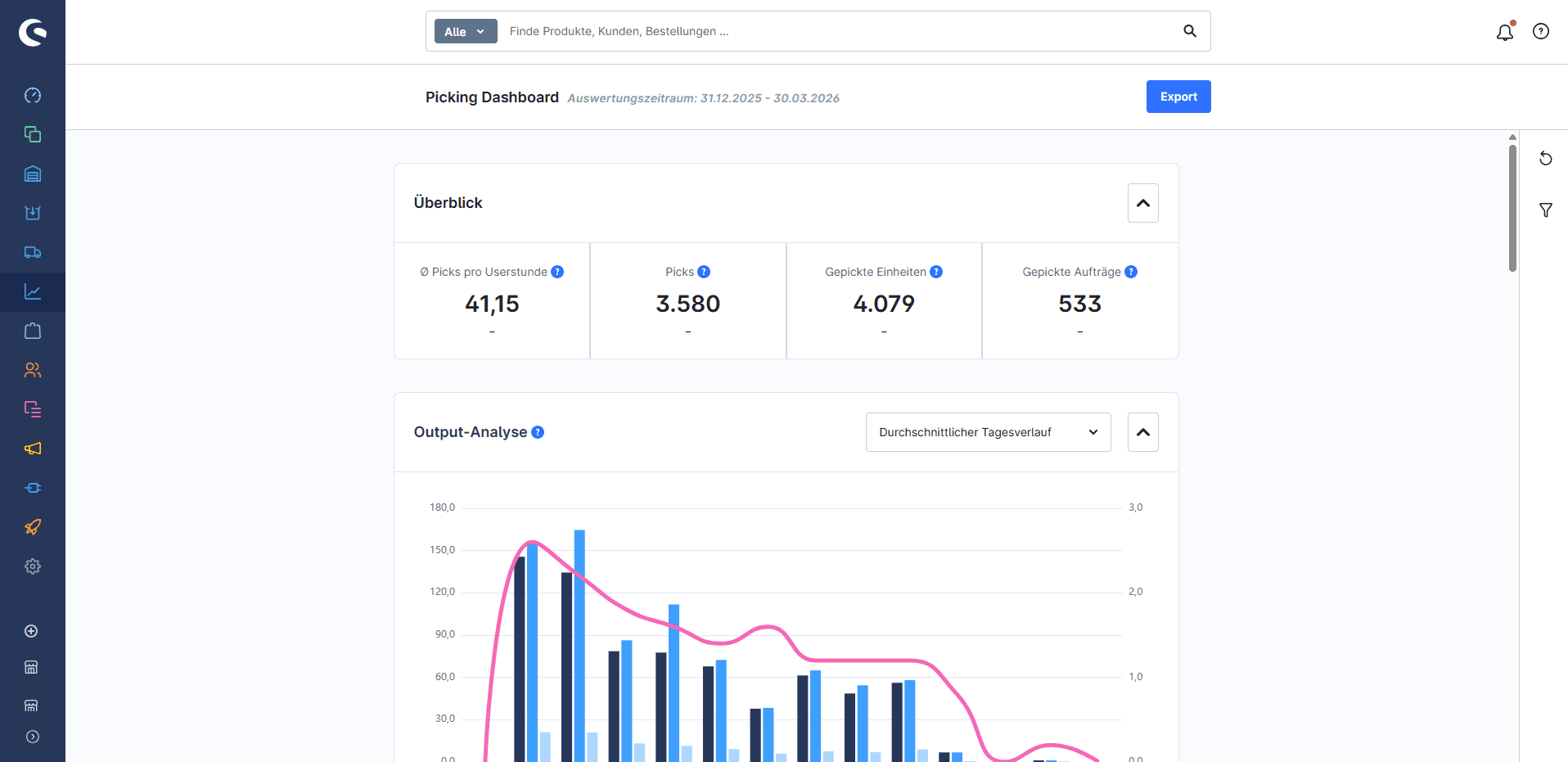
We do not see Pickware as a standalone ERP plugin, but as part of your entire Shopware setup and process landscape.
No obligation. A clear assessment of what can be implemented quickly and where effort is needed.
3 typical starting situations
Who is Pickware especially suitable for?
Pickware is especially useful when ...
if you already work with Shopware and want to make warehouse processes more efficient
you are looking for an integrated solution instead of additional external systems
your team has to switch between several interfaces and process steps that actually belong together
Orders, inventory, and shipping still require too many manual steps today
Your business is growing, but your operations are not scaling at the same pace.
The 3 modules
Which Pickware module is right for your business?
Pickware consists of three modules that can be used individually or in combination. We help you assess which combination really makes sense for your warehouse and shipping processes.
The key is not to use all modules, but to choose the combination that truly simplifies your workflows.
Basic
Pickware ERP
Back-end inventory management
The core: warehouse management, inventory planning, purchasing, returns, automatic invoices, and DATEV export — all directly in Shopware.
From €49/month
Expansion
Pickware WMS
Mobile warehouse
Order picking, stocktaking and shipping processing via iOS app and barcode scanner — directly in the warehouse, without manual re-entry.
ERP extension module
Optional
Pickware POS
POS system
Online and in-store sales through one system. All Shopware product and customer data is available at checkout right away.
For retail stores and trade fairs
Not sure which modules you need? In a short call, we’ll work it out based on your specific warehouse and shipping processes.
Why the setup matters
Installing Pickware takes minutes. Properly setting it up is the real effort.
Pickware is quick to set up in the shop. However, what comes next determines whether the system eases daily operations or creates more questions: How is the warehouse structure organized? Which inventory should be reserved for the shop and which shouldn't? How are returns processed through the system? How are shipping providers integrated? How do invoice data flow into accounting? We address these questions before installation—not afterwards.
Define the warehouse structure
Static or chaotic inventory management, returns warehouses, branch warehouses, channel-specific stock reservations. We set up the structure so your stock is always accurate.
Automate shipping processes
Connect DHL, DPD, UPS and other carriers. Labels, delivery notes and tracking numbers are created automatically when an order comes in.
Organize purchasing
Add suppliers, define reorder points, and set up purchase suggestions based on past sales figures. No more reactive purchasing.
Connect accounting
Automatically create invoices and export DATEV posting batches. The handoff to accounting runs without manual steps.
Who Pickware Is For
Pickware is the right choice if Shopware is to remain your central system.
Pickware is not a universal ERP for every process. It is an inventory management system built for Shopware, where it excels. This makes it the right choice for certain types of businesses – and a deliberate decision against a standalone ERP system.
Good fit
Shopware 6 is your primary sales channel
You want to manage your warehouse and shop in one backend.
Your team should not have to switch between two systems
You need mobile warehouse processes in an app (WMS)
You also run a store or sell at trade shows (point of sale).
Less suitable
Complex ERP processes beyond warehousing and shipping (production, multi-stage manufacturing)
Shop on Shopify, WooCommerce or other systems (not the Shopware backend)
High-volume warehouse processes with our own WMS system
If Pickware doesn't fit your needs, we recommend an alternative – for example, Reybex as a cloud ERP for more complex B2B processes.
We are your partner
Why Commerce Partner is the right Pickware partner
Implementing Pickware is not just a software project. What matters is how well the solution fits your processes, your system landscape, and your day-to-day operations. This is exactly where many projects run into unnecessary friction, added complexity, and costly follow-up problems.
That is why we look at more than just the setup:
How are orders, warehouse processes, and shipping handled today?
Where do manual workarounds or duplicate work occur?
Which Pickware modules deliver immediate value, and which ones only later?
How can the solution be integrated into your existing infrastructure?
You do not get a service provider who only sets up software. You get a partner who understands e-commerce processes, system environments, and the day-to-day reality of mid-sized businesses.
Experience in e-commerce and system projects since 1999
Strategy, technical design and implementation from a single source
Practical know-how from over 2,700 projects in digital sales
Pickware setups that fit your workflows — not the other way around
That way, you get not just a working setup, but above all clarity, confidence, and a partner who shares responsibility.
Approach
From first conversation to a live system in three steps
No lengthy project plan, no unnecessary coordination. We quickly clarify what your setup needs, configure it, and support you through go-live.
1
Process review – what is working today, and what should be improved?
We look at how your warehouse is currently structured, which shipping channels you use, how purchasing works, and where most time is being lost. From this, we determine which modules and which setup make sense.
2
Setup – warehouse, shipping, purchasing, accounting
We tailor Pickware to fit your operations: warehouse structure, inventory rules, shipping providers, supplier setup, returns, and DATEV export. WMS and POS can also be integrated upon request.
3
Go-live and handover to your team
We review all processes, train your team, and support the launch. After that, we can keep supporting you as needed—for new requirements, new channels, or additional modules.
No obligation. In 30 minutes, you’ll know what your setup needs and what it costs.
Relevant blog articles
From our blog about Pickware

FAQ
Frequently Asked Questions about Pickware
Traditional ERP systems operate as standalone software alongside the shop and require integration via interfaces. Pickware is directly integrated into Shopware – no second system, no synchronization, no second login. This simplifies implementation and makes operations more stable.
Pickware provides excellent coverage for warehousing, shipping, purchasing, and accounting. For companies with more complex ERP needs—such as multi-step manufacturing processes or extensive EDI integration—we recommend considering Reybex as an alternative in a consultation.